Meshtastic turns cheap LoRa radio boards into a text messaging mesh. Each node passes messages on for the others, so they travel for miles with no mobile signal and no internet. I’ve got one node running full time in the loft with its antenna on the roof, and everything it hears goes into Home Assistant: my node’s health, a table of the nodes around me, and the mesh chat.
| At a glance | |
|---|---|
| Radio | Heltec V3 style board (ESP32 and SX1262 LoRa), 868 MHz for the UK |
| Where | My loft comms rack, with the antenna on the roof |
| Into Home Assistant | The node’s own MQTT module, sending JSON to the Mosquitto broker |
| In Home Assistant | Battery, voltage, channel use, airtime, uptime, last packet, nodes heard, node names, chat |
| Needs | Home Assistant with Mosquitto. No custom integration |
| Config | meshtastic-templates.yaml and meshtastic-dashboard.yaml |
Why Meshtastic
Partly it’s a backup. If mobile signal or the internet goes down, a LoRa mesh still carries messages on its own. Partly I wanted to play with LoRa, antennas and coax. There’s already an active mesh around London and the South East, so a node with a roof antenna has plenty to talk to. And I wanted the mesh in Home Assistant alongside everything else, the same way my servers are.
The Hardware
Everything I used:
| Part | What it does | Where from |
|---|---|---|
| ESP32 LoRa V3 board kit (Heltec V3 design, SX1262 radio, 868 MHz), with a case, 1100mAh battery, small antenna and USB cable | The Meshtastic node itself | Amazon |
| 868 MHz omni soft whip antenna, 17 cm, SMA male, listed as 10 dBi | The antenna on the roof | Amazon |
| TUOLNK RG174 coax, 3 m, SMA male to female bulkhead, with 3 SMA adapters | Runs from the board in the loft up to the antenna | Amazon |
| A long USB-C cable and a generic USB plug | Power | Anything you have spare |
868 MHz is the band Meshtastic uses in the UK and Europe, so buy the 868 MHz versions of the board and antenna.
The board lives in the comms rack in my loft, powered over the long USB-C cable. The coax runs from the board through a bulkhead fitting to the whip antenna on the roof outside.
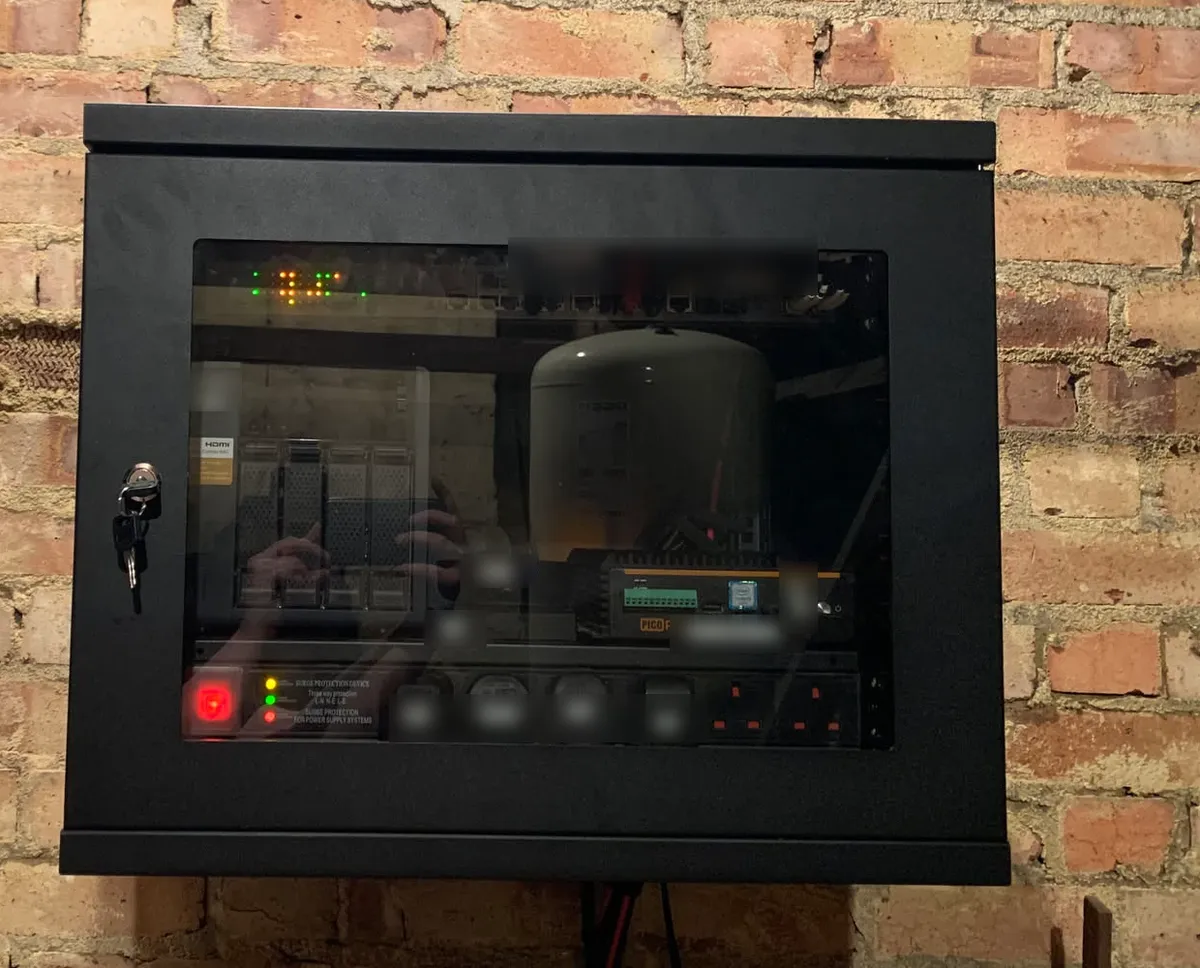
Thin coax like RG174 loses some signal over every metre at 868 MHz, so it’s worth keeping the run as short as the job allows.
Flashing it
I flashed Meshtastic with the web flasher. Plug the board in over USB, open the flasher in Chrome or Edge, and its auto detect picks out the board. Choose a firmware version, flash it, and the board comes up as a Meshtastic node ready to set up from the app. There’s no toolchain to install.
Getting the Mesh into Home Assistant
Meshtastic has an MQTT module built in. I pointed it at the Mosquitto broker that already runs in Home Assistant for my server agent and Zigbee2MQTT, and turned on JSON output. Now every packet my node hears, from any node on the mesh, arrives in Home Assistant as a small JSON message, about 600 a day:
msh/EU_868/England/2/json/LongFast/!a1b2c3d4
{"from": 1205151091, "sender": "!a1b2c3d4", "type": "telemetry", "hops_away": 3,
 "snr": -14, "rssi": -110, "payload": {"temperature": 19.5, "relative_humidity": 44.9, ...}}
JSON output is only available on ESP32 based boards, so check yours before you buy. The settings that matter on the node are:
- MQTT enabled, with your Home Assistant address and an MQTT user.
- JSON output enabled.
- Root topic: mine is
msh/EU_868/England, and it has to match the topics in the config below. - Uplink enabled on the LongFast channel.
- TLS enabled if your broker has a certificate. Mosquitto in Home Assistant listens for encrypted MQTT on port 8883 once you give it one, and I covered setting that up in the server agent post.
Everything after that is template sensors, with no custom integration and nothing from HACS.
The Catch: Whose Battery Is That?
My first version had a battery sensor that read the battery level from any telemetry packet. It looked fine until I counted the readings. In one day the sensor took 164 battery readings, and only 58 of them were from my node. The other 106 came from nine other nodes on the mesh, so “my” battery was really whichever node had reported last, anywhere from 81% to 100%.
Each JSON message has two fields that sort this out. from is the node that sent the packet, and sender is the node that uplinked it to MQTT, which is always mine. When the two match, the packet is my node’s own:
{{ ('!%08x' | format(p.from | int)) == p.sender }}Every sensor about my node now checks that first. Because of that, the config has no node ID in it and works for anyone’s node without changes.
What Home Assistant Shows
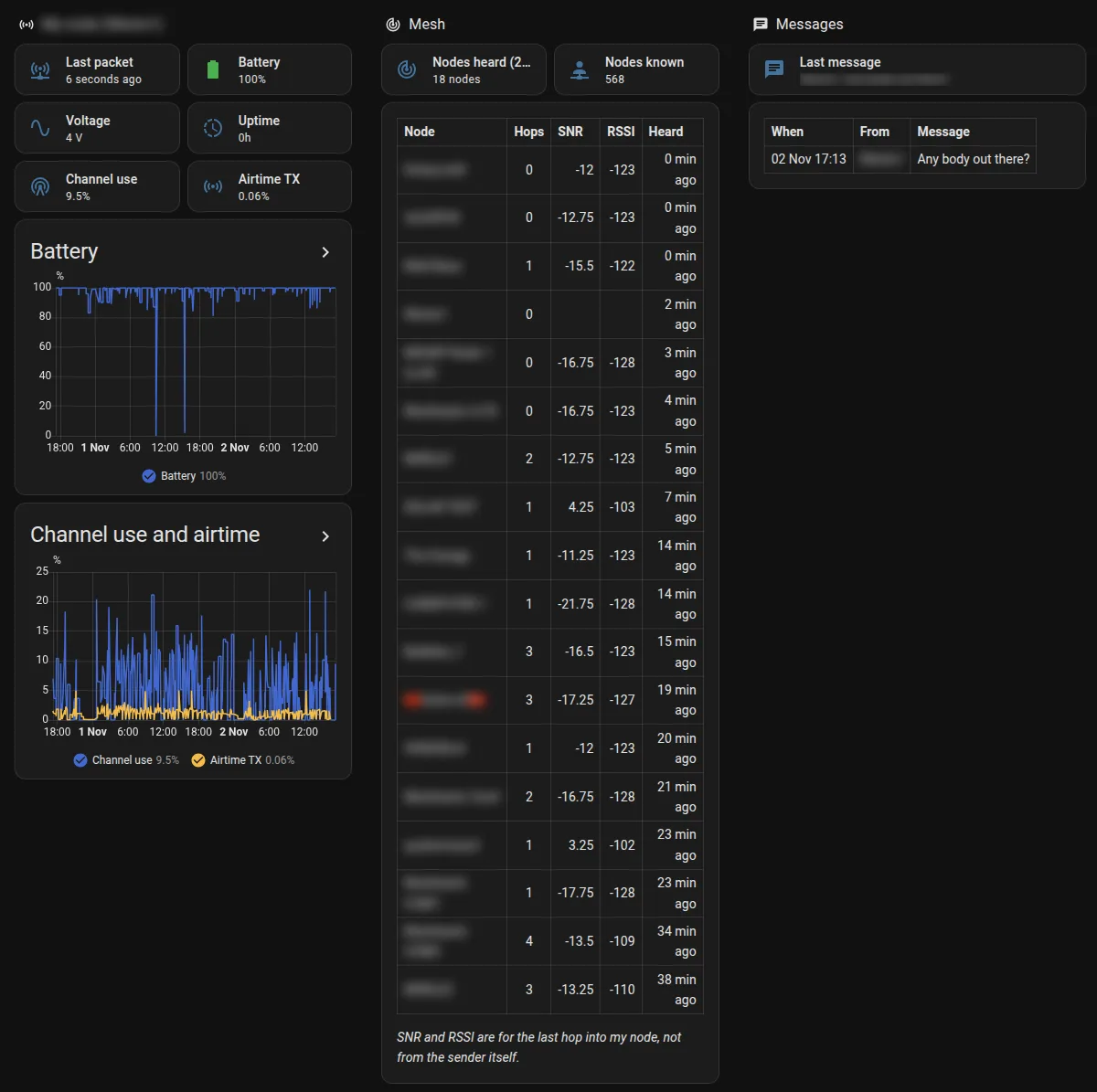
| Entity | What it shows |
|---|---|
| Battery and Voltage | My node only. Meshtastic reports 101% on external power, so the sensor shows 100% and flags it |
| Channel Utilisation and Air Util TX | How busy the channel is, and how much of the airtime my node uses |
| Uptime | Hours since the node last restarted |
| Last Packet | When anything last came through. If this goes stale, the node or its uplink has stopped |
| Nodes Heard | Nodes heard in the last 24 hours, with name, hops, signal and when |
| Node Registry | Every node name seen, so messages show names instead of numbers. Mine knows 568 |
| Last Message and Chat Log | The latest message, and the last 20 with time and sender |
The dashboard has three sections. My node has status tiles and 48 hour graphs of battery, channel use and airtime. Mesh has a table of the 25 most recently heard nodes with their hops, SNR and RSSI. Messages has the chat as a table.
The SNR and RSSI in that table are for the last hop into my node, not from the node that sent the message. For a node three hops away, it’s the signal from whichever node passed it on to me. It’s still a good guide to which nearby nodes my roof antenna hears well.
How I Use It
Mostly I glance at Last Packet and Uptime to check the node is running and still talking to Home Assistant. The node table shows who’s around, how many hops away and how well I hear them, and I can read the mesh chat without opening the Meshtastic app. The graphs show how busy the channel gets over a day and how much of that is my node.
The Config
This is the exact config running in my Home Assistant. It doesn’t need node IDs, addresses or passwords, so I haven’t had to remove anything from it. Both files are below to read and download. To set it up:
- Set up the node’s MQTT as above, and check packets arrive (in Home Assistant, Settings › Devices & services › MQTT › Configure, listen to
msh/#). - Make sure
configuration.yamlhastemplate: !include templates.yaml, then add the sensors totemplates.yaml. If your root topic isn’tmsh/EU_868/England, change the fivetopic:lines. - Check the configuration, then reload Template entities under Developer tools › YAML.
- Add a view to a dashboard, choose Edit in YAML and paste in the dashboard file.
The sensors fill in as packets arrive. Node names build up from the nodeinfo packets nodes send every few hours, and the battery updates when your node sends its own telemetry.
meshtastic-templates.yaml (the sensors)
# -------------------------------------------------
# MESHTASTIC
# Your node uplinks everything it hears as JSON to msh/EU_868/England/2/json/LongFast/<node>.
# Each packet's "sender" is the uplinking node (yours) and "from" is the node that sent it, so a
# packet is your node's own when "!%08x" of from equals sender. Other nodes' telemetry is ignored
# for your node's sensors, so they never show someone else's battery.
# If your node uses a different region or root topic, change the 5 "topic:" lines.
# -------------------------------------------------

# Your node's own device telemetry: battery, voltage, channel use, uptime.
- trigger:
    - platform: mqtt
      topic: "msh/EU_868/England/2/json/LongFast/+"
  condition:
    - condition: template
      value_template: >
        {% set p = trigger.payload_json %}
        {{ p is mapping and p.type == 'telemetry' and p.from is defined and p.sender is defined
           and ('!%08x' | format(p.from | int)) == p.sender
           and p.payload is mapping and p.payload.voltage is defined }}
  sensor:
    - name: "Meshtastic Battery Voltage"
      unique_id: meshtastic_own_battery_voltage
      device_class: voltage
      state_class: measurement
      unit_of_measurement: "V"
      state: >
        {% set v = (trigger.payload_json | default({})).payload | default({}) %}
        {{ v.voltage | float | round(2) if v.voltage is defined else this.state }}
    - name: "Meshtastic Battery Percent"
      unique_id: meshtastic_own_battery_percent
      device_class: battery
      state_class: measurement
      unit_of_measurement: "%"
      # Meshtastic reports 101 when it's running on external power.
      state: >
        {% set v = (trigger.payload_json | default({})).payload | default({}) %}
        {{ [v.battery_level | int, 100] | min if v.battery_level is defined else this.state }}
      attributes:
        external_power: "{{ (((trigger.payload_json | default({})).payload | default({})).battery_level | default(0) | int) > 100 }}"
    - name: "Meshtastic Channel Utilisation"
      unique_id: meshtastic_own_channel_utilisation
      state_class: measurement
      unit_of_measurement: "%"
      icon: mdi:radio-tower
      state: >
        {% set v = (trigger.payload_json | default({})).payload | default({}) %}
        {{ v.channel_utilization | float | round(1) if v.channel_utilization is defined else this.state }}
    - name: "Meshtastic Air Util TX"
      unique_id: meshtastic_own_air_util_tx
      state_class: measurement
      unit_of_measurement: "%"
      icon: mdi:access-point
      state: >
        {% set v = (trigger.payload_json | default({})).payload | default({}) %}
        {{ v.air_util_tx | float | round(2) if v.air_util_tx is defined else this.state }}
    - name: "Meshtastic Uptime"
      unique_id: meshtastic_own_uptime
      device_class: duration
      unit_of_measurement: "h"
      state: >
        {% set v = (trigger.payload_json | default({})).payload | default({}) %}
        {{ (v.uptime_seconds | int / 3600) | round(1) if v.uptime_seconds is defined else this.state }}

# When anything last came through from your node: the uplink is working.
- trigger:
    - platform: mqtt
      topic: "msh/EU_868/England/2/json/LongFast/+"
  sensor:
    - name: "Meshtastic Last Packet"
      unique_id: meshtastic_last_packet
      device_class: timestamp
      icon: mdi:access-point-network
      state: "{{ now().isoformat() }}"
      attributes:
        type: "{{ trigger.payload_json.type | default('') }}"

# Names of every node ever heard (from nodeinfo packets), so messages show a name, not a number.
- trigger:
    - platform: mqtt
      topic: "msh/EU_868/England/2/json/LongFast/+"
  condition:
    - condition: template
      value_template: >
        {% set p = trigger.payload_json %}
        {{ p is mapping and p.type == 'nodeinfo' and p.from is defined and p.payload is mapping }}
  sensor:
    - name: "Meshtastic Node Registry"
      unique_id: meshtastic_node_registry
      icon: mdi:account-network
      state: "{{ (state_attr('sensor.meshtastic_node_registry', 'nodes') or {}) | count }}"
      attributes:
        nodes: >
          {% set p = trigger.payload_json %}
          {% set old = state_attr('sensor.meshtastic_node_registry', 'nodes') or {} %}
          {% set name = p.payload.longname | default(p.payload.shortname | default(p.payload.id | default(p.from))) %}
          {{ dict(old, **{(p.from | string): name}) }}

# Nodes heard in the last 24 hours: name, hardware, when, hops and the last hop's signal (into your node).
- trigger:
    - platform: mqtt
      topic: "msh/EU_868/England/2/json/LongFast/+"
  condition:
    - condition: template
      value_template: "{{ trigger.payload_json is mapping and trigger.payload_json.from is defined }}"
  sensor:
    - name: "Meshtastic Nodes Heard"
      unique_id: meshtastic_nodes_heard
      icon: mdi:radar
      unit_of_measurement: "nodes"
      state_class: measurement
      state: >
        {% set old = state_attr('sensor.meshtastic_nodes_heard', 'nodes') or {} %}
        {% set cutoff = as_timestamp(now()) - 86400 %}
        {% set ns = namespace(n=0) %}
        {% for k, v in old.items() if v is mapping and v.last > cutoff and k != (trigger.payload_json.from | string) %}
          {% set ns.n = ns.n + 1 %}
        {% endfor %}
        {{ ns.n + 1 }}
      attributes:
        nodes: >
          {% set p = trigger.payload_json %}
          {% set t = as_timestamp(now()) | int %}
          {% set id = p.from | string %}
          {% set old = state_attr('sensor.meshtastic_nodes_heard', 'nodes') or {} %}
          {% set prev = old.get(id) if old.get(id) is mapping else {} %}
          {% set names = state_attr('sensor.meshtastic_node_registry', 'nodes') or {} %}
          {% set info = p.payload if p.type == 'nodeinfo' and p.payload is mapping else {} %}
          {% set rec = {
               'name': info.longname | default(names.get(id, prev.name | default('!%08x' | format(p.from | int)))),
               'hw': info.hardware | default(prev.hw | default(none)),
               'last': t,
               'hops': p.hops_away | default(prev.hops | default(none)),
               'snr': p.snr | default(prev.snr | default(none)),
               'rssi': p.rssi | default(prev.rssi | default(none)),
             } %}
          {% set ns = namespace(out={}) %}
          {% for k, v in old.items() if v is mapping and v.last > t - 86400 %}
            {% set ns.out = dict(ns.out, **{k: v}) %}
          {% endfor %}
          {{ dict(ns.out, **{id: rec}) }}

# Text messages on LongFast: the latest one, and the last 20 with time and sender.
- trigger:
    - platform: mqtt
      topic: "msh/EU_868/England/2/json/LongFast/+"
  condition:
    - condition: template
      value_template: >
        {% set p = trigger.payload_json %}
        {{ p is mapping and p.type == 'text' and p.payload is mapping and p.payload.text is defined }}
  sensor:
    - name: "Meshtastic Last Message"
      unique_id: meshtastic_last_message
      icon: mdi:message-text
      state: >
        {% set p = trigger.payload_json %}
        {% set sender = (state_attr('sensor.meshtastic_node_registry', 'nodes') or {}).get(p.from | string, '!%08x' | format(p.from | int)) %}
        {{ (sender ~ ': ' ~ p.payload.text)[:250] }}
      attributes:
        sender: >
          {{ (state_attr('sensor.meshtastic_node_registry', 'nodes') or {}).get(trigger.payload_json.from | string, '!%08x' | format(trigger.payload_json.from | int)) }}
        message: "{{ trigger.payload_json.payload.text }}"
    - name: "Meshtastic Chat Log"
      unique_id: meshtastic_chat_log
      icon: mdi:message-badge
      # State: when the last message arrived (the messages themselves are in the attribute).
      state: "{{ now().strftime('%d %b %H:%M') }}"
      attributes:
        messages: >
          {% set p = trigger.payload_json %}
          {% set sender = (state_attr('sensor.meshtastic_node_registry', 'nodes') or {}).get(p.from | string, '!%08x' | format(p.from | int)) %}
          {% set old = state_attr('sensor.meshtastic_chat_log', 'messages') %}
          {% set old = old if old is list else [] %}
          {{ ([{'time': now().strftime('%d %b %H:%M'), 'from': sender, 'hops': p.hops_away | default(none),
                'text': p.payload.text[:200]}] + old)[:20] }}
meshtastic-dashboard.yaml (the dashboard view)
type: sections
max_columns: 4
title: Meshtastic
path: meshtastic
sections:
- type: grid
  cards:
  - type: heading
    heading: My node
    heading_style: title
    icon: mdi:access-point
  - type: tile
    entity: sensor.meshtastic_last_packet
    name: Last packet
  - type: tile
    entity: sensor.meshtastic_battery_percent
    name: Battery
  - type: tile
    entity: sensor.meshtastic_battery_voltage
    name: Voltage
  - type: tile
    entity: sensor.meshtastic_uptime
    name: Uptime
  - type: tile
    entity: sensor.meshtastic_channel_utilisation
    name: Channel use
  - type: tile
    entity: sensor.meshtastic_air_util_tx
    name: Airtime TX
  - type: history-graph
    title: Battery
    hours_to_show: 48
    entities:
    - entity: sensor.meshtastic_battery_percent
      name: Battery
    grid_options:
      columns: 12
  - type: history-graph
    title: Channel use and airtime
    hours_to_show: 48
    entities:
    - entity: sensor.meshtastic_channel_utilisation
      name: Channel use
    - entity: sensor.meshtastic_air_util_tx
      name: Airtime TX
    grid_options:
      columns: 12
- type: grid
  cards:
  - type: heading
    heading: Mesh
    heading_style: title
    icon: mdi:radar
  - type: tile
    entity: sensor.meshtastic_nodes_heard
    name: Nodes heard (24h)
  - type: tile
    entity: sensor.meshtastic_node_registry
    name: Nodes known
  - type: markdown
    content: |-
      {% set nodes = state_attr('sensor.meshtastic_nodes_heard', 'nodes') or {} %}
      {% set ns = namespace(rows=[]) %}
      {% for k, v in nodes.items() if v is mapping %}{% set ns.rows = ns.rows + [v] %}{% endfor %}
      {% if ns.rows %}
      | Node | Hops | SNR | RSSI | Heard |
      |:--|:-:|--:|--:|--:|
      {% for v in (ns.rows | sort(attribute='last', reverse=true))[:25] -%}
      | {{ v.name | replace('|', '/') }} | {{ v.hops if v.hops is not none else '?' }} | {{ v.snr if v.snr is not none else '' }} | {{ v.rssi if v.rssi is not none else '' }} | {{ ((as_timestamp(now()) - v.last) / 60) | int }} min ago |
      {% endfor %}
      {% if ns.rows | count > 25 %}_and {{ ns.rows | count - 25 }} more_{% endif %}
      _SNR and RSSI are for the last hop into my node, not from the sender itself._
      {% else %}No nodes heard yet.{% endif %}
    grid_options:
      columns: 12
- type: grid
  cards:
  - type: heading
    heading: Messages
    heading_style: title
    icon: mdi:message-text
  - type: tile
    entity: sensor.meshtastic_last_message
    name: Last message
    vertical: false
    grid_options:
      columns: 12
      rows: 1
  - type: markdown
    content: |-
      {% set m = state_attr('sensor.meshtastic_chat_log', 'messages') or [] %}
      {% if m %}
      | When | From | Message |
      |:--|:--|:--|
      {% for x in m -%}
      | {{ x.time }} | {{ x['from'] | replace('|', '/') }} | {{ x.text | replace('|', '/') | replace('\n', ' ') }} |
      {% endfor %}
      {% else %}No messages since the log was set up.{% endif %}
    grid_options:
      columns: 12
The name list only ever grows. Once it holds several hundred nodes, Home Assistant may log that the sensor’s attributes are too big to keep in history. That only affects history, and the names still work.
Final Thoughts
The hardware is a small board, a USB cable, 3 metres of coax and an antenna on the roof. If you already run Mosquitto, the Home Assistant side is two YAML files. For more on how the rest of my smart home fits together, see the rules my smart home lives by.
Tags: Meshtastic, LoRa, Home Assistant, MQTT, Mosquitto, Radio
What to read next
3 pages
Got a question about this, or built something similar? Get in touch. New write-ups go out on the RSS feed and LinkedIn, everything I've built is on the projects page, and my free calculators and guides are on the tools page.