Tetris is the falling-blocks puzzle that everyone knows. This is Vadim Gerasimov’s freeware DOS version, 3.12, which is a tiny 14 KB file.
Mature game 18+
Please confirm that you are 18 or over to continue. This is a self-check and is only remembered on this device.
About this version
Vadim Gerasimov made this DOS version available for free download, and it’s unchanged here.
How to play
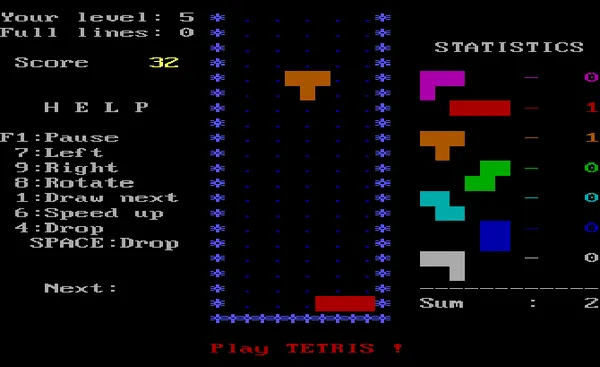
The game shows its own keys on the right of the screen: 7 moves the block left, 9 moves it right, 8 rotates it, 4 or Space drops it and 6 speeds it up. F1 pauses. Clear lines to score and speed up. Keep the stack flat and leave one column free for the long piece.
Tips
- Keep the stack flat. Gaps are what cause trouble later, so fill them before you chase a line.
- Leave one column free. A clear column on the edge lets you clear four lines at once with the long piece.
- Use the next piece. The game can show what’s coming, so plan where it goes before the current one lands.
- Start at a lower level. The setup screen lets you pick your level, so start low until you know the controls.
A bit of history
Alexey Pajitnov created Tetris in 1984 while working at the Soviet Academy of Sciences in Moscow. This version is the freeware DOS game credited to A. Pajitnov and V. Gerasimov, with Vadim Gerasimov as the programmer of the PC port. Version 3.12 is the final release, and the whole game is a 14 KB file. It starts at a setup screen where you choose a level and options.
Full screen and saves
Press the Full screen button under the game to fill your screen, and Esc to leave it.
Not every game in this set lets you save. Where it does, save inside the game as normal, then press the floppy disk button at the top of the player’s side bar, which says “Saved in browser”. Your save stays on your own device and nothing is uploaded. Clearing your browser data removes it.
Quick answers
How do I start a game?
Press Space at the title screen, then pick your options and press Space again to start.
What are the controls?
The game’s own help panel lists them: 7 moves left, 9 moves right, 8 rotates, 4 or Space drops, 6 speeds up and F1 pauses.
Is it free?
Yes. Vadim Gerasimov made this DOS version available as freeware.
Does it save my high score?
The game keeps its own high score table, and you can keep it by pressing the floppy disk button under the screen.
More games
This is part of the classic DOS games set.
- Lemmings: a puzzle game with a plan-ahead feel
- Minesweeper: a quiet logic puzzle
- All the games on this site, from retro Windows card games to sysadmin puzzles
Related projects
3 pages