My family now has their own app for talking to Jarvis, the AI assistant that looks after my homelab. It’s called Jarvis AI, it’s a Windows installer of about 2.5 MB, and it sits in the system tray listening for “Hey Jarvis”. I built it with Claude over a few days, in Rust, using Tauri. The code for the app is on GitHub. The assistant behind it stays private.
| At a glance | |
|---|---|
| What it is | A Tauri 2 (Rust) Windows app that wraps my talking web page |
| Installer | About 2.5 MB, unsigned, built in GitLab CI from Linux |
| Reaches home from | Anywhere, through a Cloudflare Tunnel and a login, with no firewall ports open |
| Who can use it | Me with full access, my wife with a restricted Jarvis. The boys get theirs later |
| Code | Jarvis-AI-Desktop on GitHub, the desktop shell only |
Why a desktop app
The web page already worked, but a bookmark isn’t something my wife is going to use. I wanted it to feel like a normal app: it starts with Windows, lives in the tray, and answers to the wake word without anyone opening a browser tab. It also needed to work when we’re out, because the family uses Jarvis for the house, not just the servers.
Why Tauri and Rust
I wanted Rust and nothing heavier. Electron would have shipped a whole copy of Chromium. Tauri uses WebView2, which Windows 11 already has, so the installer is a couple of megabytes.
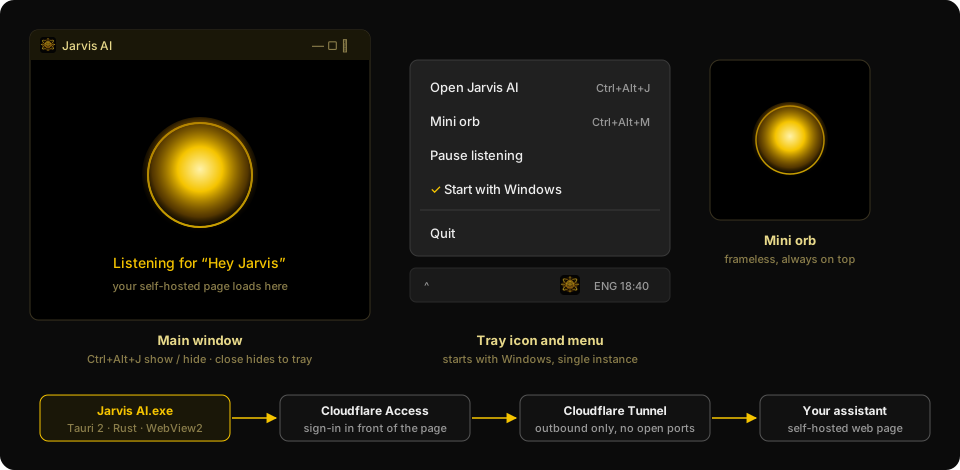
The app is thin on purpose. It opens one window that loads the Jarvis page, so almost every change to the page reaches the app straight away. Only the extras need a new installer: the tray icon, the hotkeys (Ctrl+Alt+J to show or hide, Ctrl+Alt+M for a small floating orb), starting with Windows, Windows notifications for alerts, and a “can’t reach Jarvis” screen.
The window can only load my page and the sign-in page. The page it loads is allowed to call two commands in the app, show a notification and switch to the mini orb. It can’t touch files, run a shell or open network connections.
Reaching it from anywhere with no open ports
I didn’t want to open anything on the firewall. A Cloudflare Tunnel makes an outbound connection from the Jarvis VM to Cloudflare, and Cloudflare Access puts a login in front of the address. Nothing is listening on my home connection, and nobody gets to the page without signing in.
While I was building it I tested everything on the home network first. The public address didn’t exist until the app worked, which meant that nothing was exposed while the code was still rough.
A safe Jarvis for the family
This was the part I thought hardest about, because Jarvis can run commands on my servers. My wife and sons shouldn’t be able to do that, however nicely they ask.
Each person has their own account, and accounts have a role. Mine is admin. Theirs is family, and a family request goes to a different Claude. It runs as a separate Linux user and has a short list of tools: web search, and a small set of Home Assistant actions that I choose. Locks, the alarm and the garage door are refused to the family Claude. A request that hits one of those is declined, and it’s never passed on to my own session.
The lesson I’d pass on is not to trust the prompt as a boundary. At first I limited what the family Claude could read with a path rule, so it could only open the files someone had attached. I tested that with a canary file outside the folder, and the rule didn’t hold. So I took file reading away from it completely. Now files reach it only through a small tool that opens the attachments belonging to the person asking. The limit sits in code, and I check it with a test that tries to break out.
What went wrong
The microphone. Listening was terrible at first, and my own mic wasn’t being picked up properly. I fixed the sample rate, added a mic picker with a level meter and a sensitivity setting, and made the page start listening by itself when the app opens.
The permission pop-up and the screen picker. WebView2 asked for the microphone every time. The quick fix was a browser flag that auto-approves it, but that flag also auto-picked my whole screen and the screen-share picker vanished. The proper fix is to handle the permission request in Rust: the app allows the microphone and leaves everything else to ask. Windows 11 also won’t list the app under Privacy, then Microphone. It shows up as Microsoft Edge WebView2. That’s how WebView2 apps work, so I stopped fighting it.
Dropping files. I couldn’t drag a file into the text box. Tauri handles drops itself by default, so the page never saw them. Turning that handler off fixed it.
The old version. The app kept loading an old copy of the page, and closing the window with the X only hid it to the tray. I added no-cache headers and a version check that reloads the page. Updating the installer also needs the app quit from the tray first.
Starting at login. It didn’t start with Windows. Autostart was only an unticked option in the tray menu, and nobody had ticked it. It’s now on after the first run.
Building the installer without Windows
There’s no Windows machine in the build. GitLab CI cross-compiles the Rust with cargo-xwin and builds the installer with NSIS, on a Debian-based Rust image. The first run failed over a missing path, then over a missing system library, and then because Debian’s NSIS was too old for Tauri’s installer template. Moving to a newer image fixed that one.
The installer isn’t signed, so Windows shows an “unknown publisher” warning. For a family app I’m happy with More info, then Run anyway.
How it feels
My wife has her own login and her own Jarvis, and I’m happy with the limits. She can ask it about the house and the lights, and it can’t touch the servers or the doors.
If you’re building something like this, put the boundaries in code and test them by trying to break them.
What to read next
3 pages
Got a question about this, or built something similar? Get in touch. New write-ups go out on the RSS feed and LinkedIn, everything I've built is on the projects page, and my free calculators and guides are on the tools page.