A SIEM sounds like something only a company with a security team runs. My homelab stopped being a few things on the home network a while ago, though. I host public websites and a SaaS app, so I have real servers facing the internet, and once you do that you want to know what’s knocking on the door. That’s why I run Wazuh.
What Wazuh Is
Wazuh is a free, open source security platform. It’s a SIEM (security information and event management) with endpoint monitoring built in. A small agent runs on each machine and watches logins, logs, file changes and installed packages. A central server collects all of that, applies rules to spot anything suspicious, and gives you dashboards and alerts.
I run the Wazuh server on its own VM, with agents on every server in the homelab and on our family computers. My pfSense firewall sends its log there too.
What I Watch It For
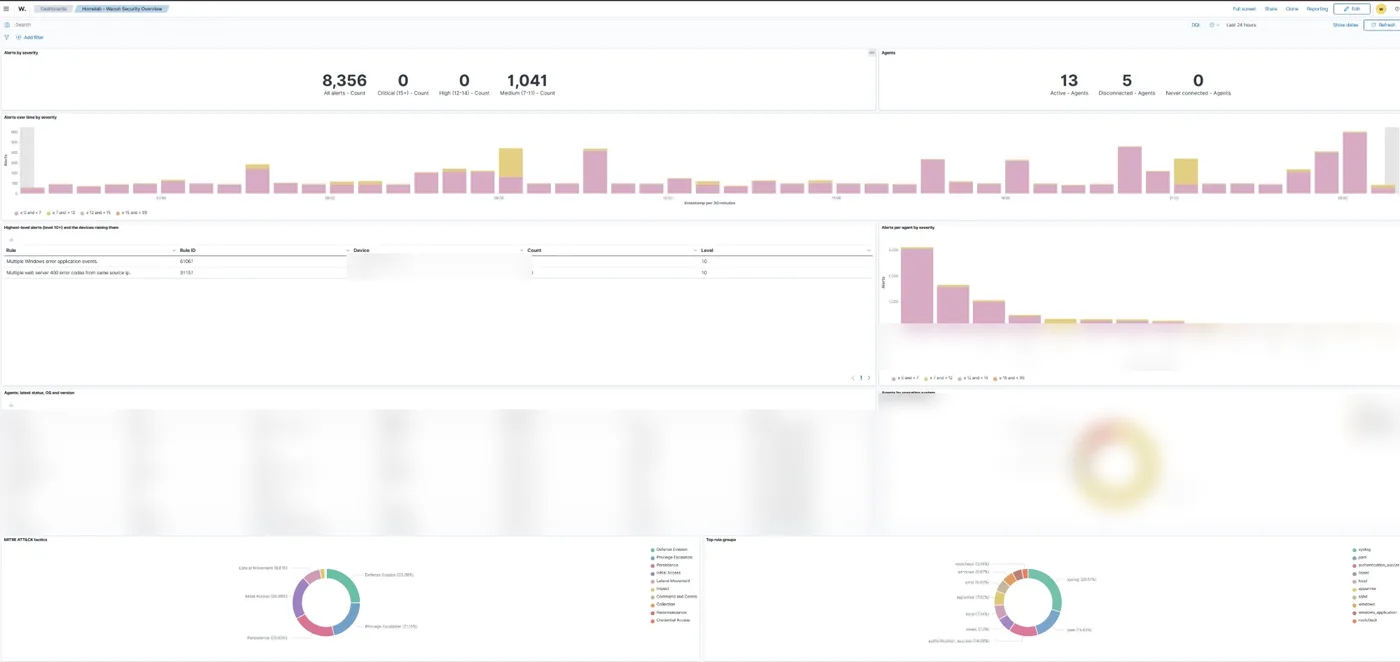
Brute force attempts and scanning
Anything facing the internet gets constant attention from bots: password guessing over SSH, scans for common admin pages and requests probing for known vulnerabilities. Wazuh groups these up so I can see which servers are being targeted, how often and from where, instead of trawling through logs on each one. The firewall blocks it sends in also feed my live attack map.
Missing patches and known vulnerabilities
Wazuh’s vulnerability detection checks the packages installed on every machine against published CVEs. It’s a second check alongside my nightly patching. If a server has fallen behind, or a package has a serious vulnerability with no fix yet, it shows up in one place for the whole fleet. I also keep an eye on new zero-days as they’re announced.
How the servers are set up
Wazuh can score each machine against the CIS security benchmarks. I run a check based on the Ubuntu benchmark on all of them, and working through its list took my Plex server from 49% to 68%.
Has It Caught Anything?
Nothing dramatic. Most of what it shows is the background noise every public server sees: bots trying passwords and scanning for things that aren’t there.
It did find one real problem, though it wasn’t an attack. An app on one of my devices kept crashing in the background, over and over, and I’d never have known. Wazuh flagged the repeated application errors, so I repaired the app and the crashing stopped.
Otherwise it means I can check that nothing has happened instead of assuming it, and if something ever does go wrong, the record of what happened, when and on which machine is already in one place.
How I Use It Day to Day
I don’t sit watching the dashboard. Jarvis, my AI homelab assistant, sends the important alerts to my Discord with a link straight to the events behind them, and there’s a Wazuh tab in Home Assistant, the same place my server alerts come from, so I can see the numbers at a glance.
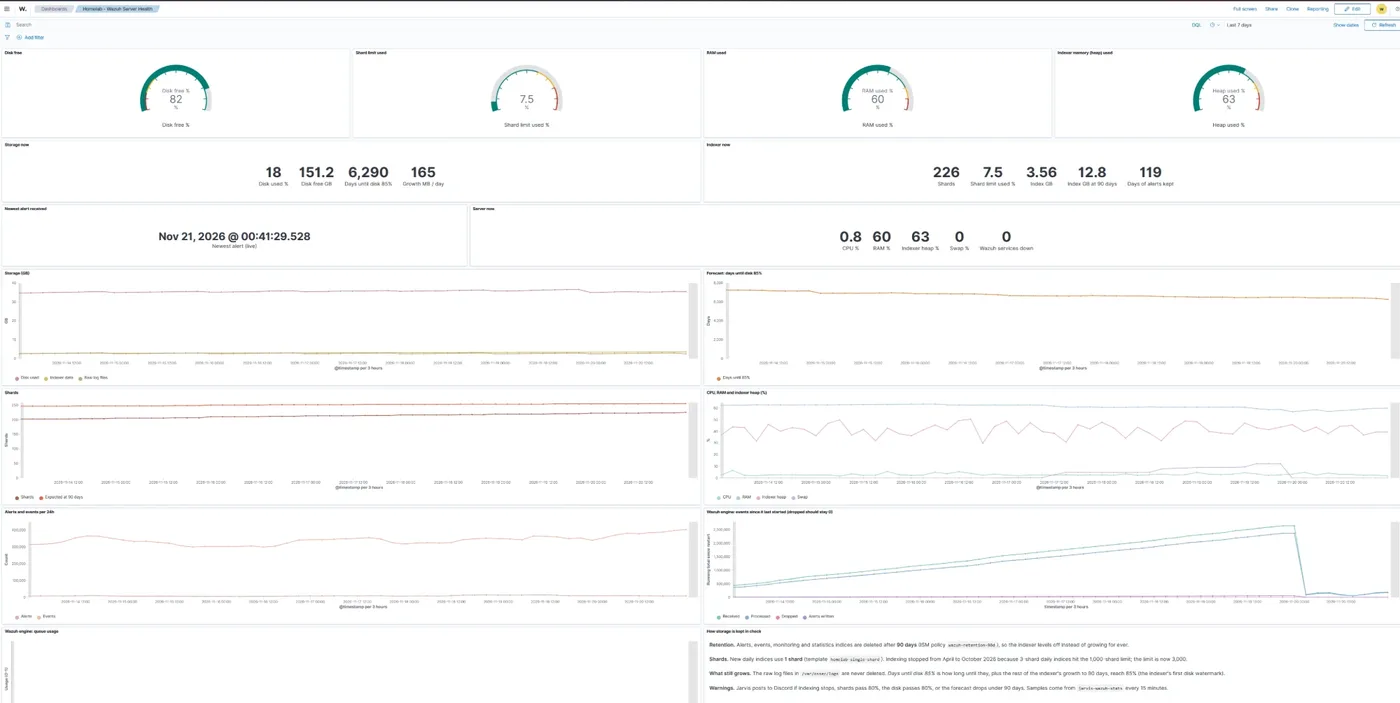
Jarvis also watches Wazuh itself. For months the server had stopped saving new alerts without any warning, because every day added three more shards and it had hit the limit of 1,000. Now each day uses a single shard, alerts are kept for 90 days, and I get a message if indexing stops or the disk or shard count gets close to its limit.
Tips If You Want to Try It
- Start with the internet facing servers. That’s where the useful signal is, and you can add the rest of the homelab once you’re comfortable.
- Give the server enough resources. Wazuh’s indexer and dashboard aren’t tiny, so give the VM a few CPU cores, plenty of memory and room for the logs to grow.
- Check it’s still saving alerts. Watch the shard count and disk space, and set a retention period so old data gets deleted.
- Expect noise at first. Out of the box you’ll see a lot of low level alerts, so spend a little time tuning out the ones that don’t matter.
- It won’t fix anything for you. Wazuh tells you what’s happening. Patching, strong SSH settings and not exposing things that don’t need to be public are what keep you safe.
Is It Worth It for a Homelab?
If everything you run stays inside your home network, Wazuh is a good way to learn but not essential. If you host anything on the public internet, it’s what Wazuh is built for, and it costs a VM and some time tuning it.
More from the blog
6 pages
Related projects
3 pages
Got a question about this, or built something similar? Get in touch. New write-ups go out on the RSS feed and LinkedIn, everything I've built is on the projects page, and my free calculators and guides are on the tools page.